The Intel Project
Intel Graphics & Media Control Panel
Enterprise UI/UX Design · Animated Windows Desktop Application
Intel selected The Skins Factory to design the Intel Graphics & Media Control Panel, an entirely new Windows desktop application for accessing and managing the power of Intel graphics hardware. The 17-month engagement spanned hundreds of schematic screens, interaction design, advanced visual design, reactive animation, custom 3D iconography, final production assets, and a companion Windows Vista Sidebar Gadget. The completed application became the second Skins Factory project to ship on more than one billion computers worldwide.
The Challenge
Turning 218 pages of hardware complexity into an intuitive application
Intel’s engineering team provided a 218-page feature-detail document supported by brand standards and additional technical materials. The application needed to give users access to extensive graphics controls, settings, information, and hardware capabilities without requiring them to understand the underlying technical complexity. Before any visual design could begin, hundreds of screens, interactions, dependencies, control states, and navigation paths had to be interpreted, organized, and translated into a coherent experience.
Our Approach
Prototyping the entire experience before reimagining what was possible
We divided the engagement into two phases. Phase 1 focused on working through the complete specification and designing hundreds of schematic pages, a process that took more than one year. With the application’s structure established, Phase 2 introduced a dark glassmorphic design language, reactive illumination, fluidly resizing panels, and control groups that appeared only when needed. Custom 3D icons, animated transitions, and a visually matched Windows Sidebar Gadget extended the same tactile experience throughout the finished product.
Intro
The Intel Graphics & Media Control Panel was one of the largest and most ambitious software design engagements The Skins Factory had taken on at the time. The work spanned approximately 17 months across a two-year period and required us to transform an enormous technical specification into a cohesive Windows desktop application.
Almost 20 years later, the interface still holds up remarkably well. Some of its visual treatments reflect the era in which it was created, but the underlying thinking remains relevant: simplify complex technology, reveal controls at the right moment, and give users access to powerful capabilities without forcing them to understand the hardware beneath them.
For context, the first-generation iPhone had just been announced and Microsoft had released Windows Vista when the project began. The completed application marked the second time work designed by The Skins Factory shipped to more than one billion PCs worldwide. The first was our work on Windows Media Player skins and Windows Vista and Windows 7 Sidebar Gadgets.
Before
In late 2007, an Intel software engineering manager contacted The Skins Factory about designing a new Windows desktop application: the Intel Graphics & Media Control Panel.
Intel’s engineering team provided us with a 218-page Feature Detail document covering the application’s extensive functionality, technical requirements, controls, settings, states, and dependencies. We also received Intel’s brand identity guidelines and additional supporting documentation.
This was not a project that could be responsibly estimated or designed as one enormous production phase. Before discussing visual design, we needed to understand the product, organize its functionality, and determine how users would move through hundreds of settings and workflows.
We therefore divided the engagement into two major phases. Phase 1 would define the application’s structure, workflows, navigation, and functionality through detailed schematics. Phase 2 would translate that approved foundation into the complete visual and interaction design.
Separating the work allowed us to provide Intel with a more accurate schedule and production estimate while reducing the risk of building high-fidelity designs around unresolved workflows.
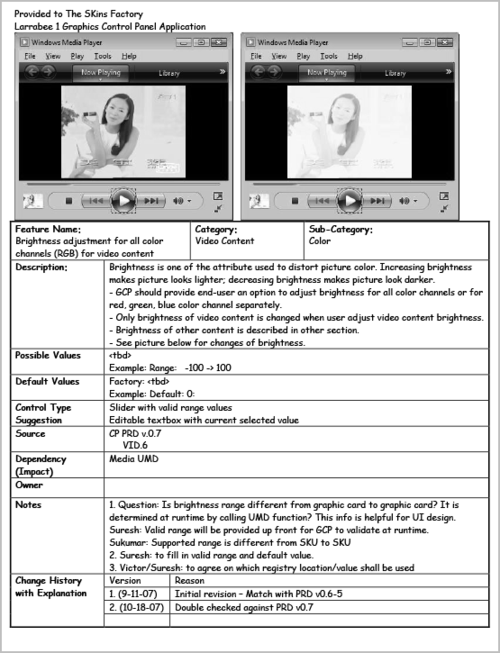


As you can see, there was a lot of information to examine just to be able to cost out the project. We also received a brand identity style guide and supplemental information documents to view. There’s a saying by Creighton Abrams: “when eating an elephant take one bite at a time.” We follow that advice when it comes to ultra large projects, so we split this project into 2 phases. Splitting the project up between the wireframing and visual design/final art allowed us to give Intel a more accurate production time + cost breakdown. We didn’t cost out Phase 2 until Phase 1 had been completed.
Phase 1
Before considering what the application would look like, we had to determine precisely how it would work.
Our team reviewed the entire 218-page specification and translated Intel’s technical requirements into screen-by-screen schematics. These early prototypes established the information hierarchy, navigation, controls, content relationships, interaction states, and user paths that would support the finished application.
Working in two dimensions allowed us to explore and revise the product quickly without investing time in polished, multilayered visual assets before the experience had been fully defined.
Hundreds of application screens were mapped during this phase. The schematics gave Intel and The Skins Factory a shared blueprint for reviewing functionality, resolving questions, and confirming how each part of the product connected to the larger system.
The Schematics


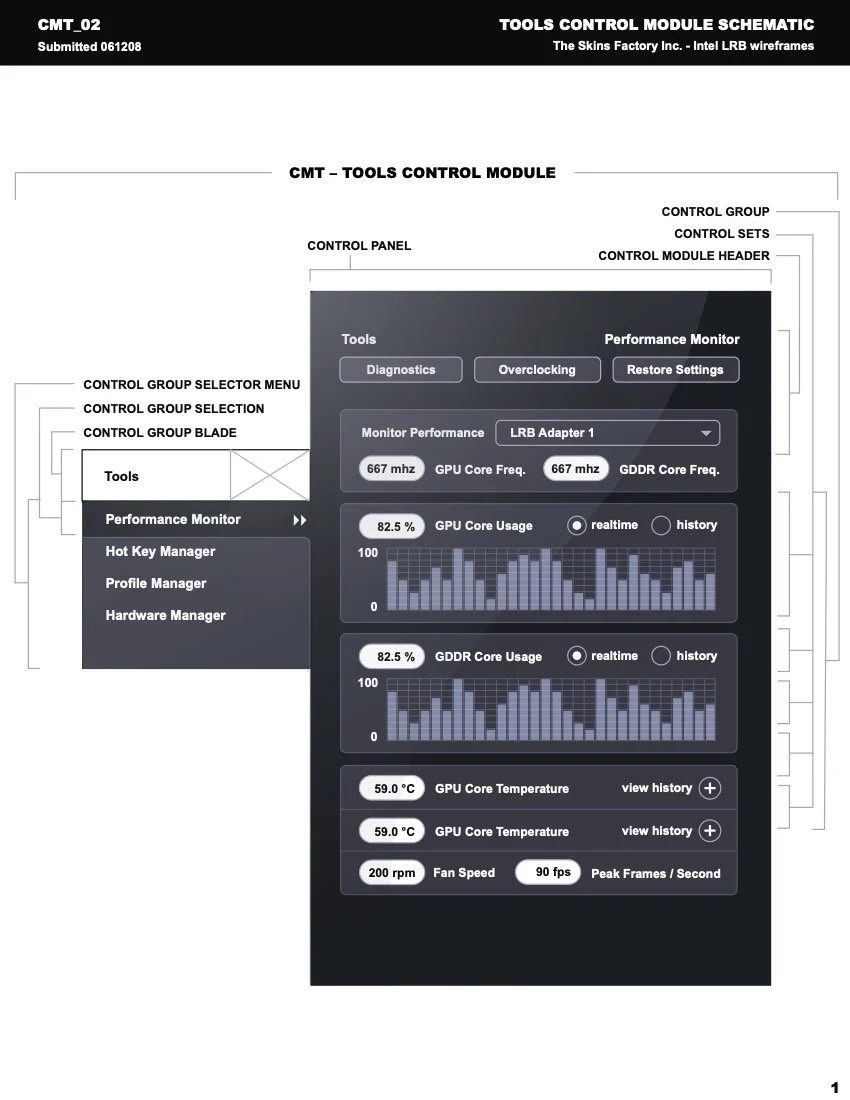

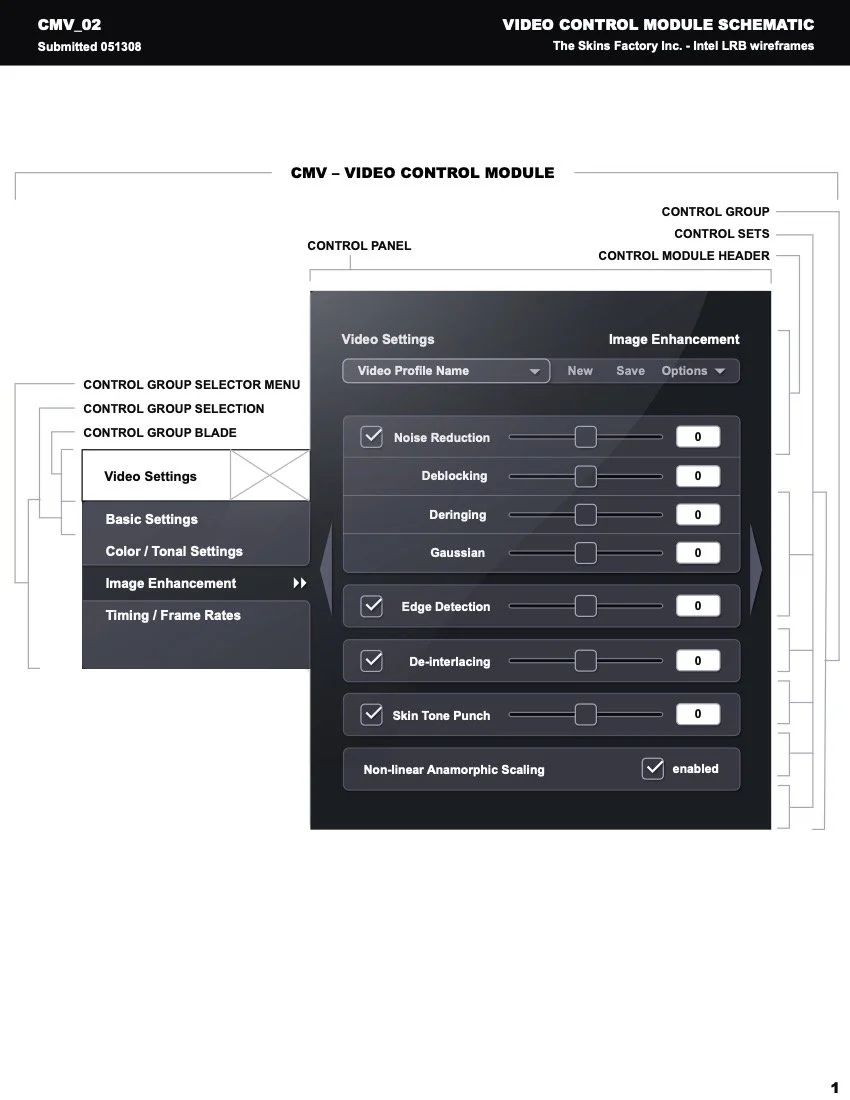


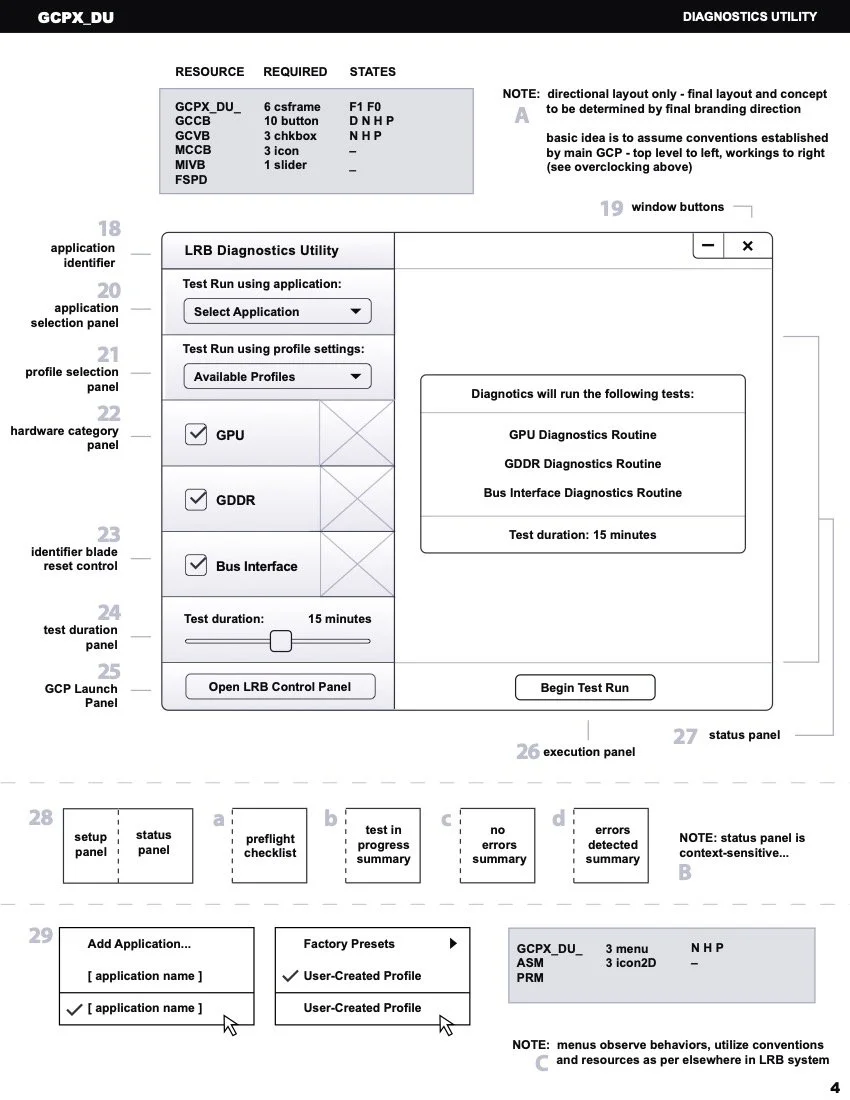
The screens shown here represent only a small portion of the schematic work completed for Intel.
Each schematic documented how users would access, understand, and control sophisticated graphics capabilities without needing to understand the technical architecture operating beneath the interface.
The system also established reusable patterns for navigation, settings, previews, status information, contextual controls, and related workflows. Creating that consistency during the schematic phase made it possible to support an extremely large application without allowing the experience to feel fragmented.
Phase 1 took more than a year to complete. Once the application’s structure and behavior had been fully defined, we moved into Phase 2 and began developing the visual design.
Phase 2
The Initial Visual Design Prototype
With the application’s UX architecture established, Intel gave us a clear directive: “Ignore what came before. Reimagine what’s possible.”
That instruction allowed us to approach the Intel Graphics & Media Control Panel as a complete product experience rather than another conventional hardware utility.
The challenge was no longer simply organizing hundreds of controls. We now had to create a visual and interaction system that made those capabilities feel approachable, responsive, and distinctly different from the standard Windows configuration applications of the time.
We began Phase 2 with a series of exploratory visual concepts.
At this stage, the work remained intentionally low fidelity. The objective was not to perfect every icon, material, highlight, or animation. It was to establish the application’s visual foundation and determine how its navigation, panels, controls, and information hierarchy would behave within the finished interface.
These early concepts became the bridge between the approved schematics and the advanced visual design. They allowed us to test composition, scale, panel behavior, navigation placement, and overall visual direction before applying the level of polish required across hundreds of screens. The concepts also helped us determine how the application could feel more tactile and immersive without allowing its visual design to interfere with clarity or usability.


Advanced Visual Design Prototype
“… liquid light dances across a dark, rich glass - the UI gives the impression of a futuristic touch-screen…”
- William B., Senior Designer @ The Skins Factory
Once the primary direction had been established, we developed a dark, glass-like interface built around depth, illumination, motion, and responsive control states. The application used layered transparency, directional lighting, fluidly resizing panels, and context-sensitive control assemblies to create an interface that felt advanced without overwhelming the user.
Reactive animations played an important role in the experience. Groups of controls illuminated as the cursor approached, directing attention toward available actions and helping users understand which parts of the interface were interactive. Controls and panels appeared only when they were relevant to the current task. This reduced visual overload, preserved an efficient desktop footprint, and allowed the application to support extensive functionality without presenting every option simultaneously.
The visual design was expressive, but its purpose was practical: make complex graphics hardware easier to configure, understand, and control.


Iconography Design
The application’s tactile visual language required an equally distinctive icon system. Rather than treating the icons as secondary decoration, we designed a custom collection of highly stylized three-dimensional icons that shared the same material, lighting, depth, and visual character as the larger interface.
Each icon needed to remain recognizable at a glance while supporting the application’s categories, settings, and actions. Shape, color, texture, and dimensional detail were used to help differentiate functions throughout the product.
The resulting iconography became an integral part of the experience and reinforced the sense that every part of the application belonged to one carefully designed system.
Windows Vista Sidebar Gadget
The Skins Factory also designed a companion Windows Vista Sidebar Gadget that shared the visual language of the Intel Graphics & Media Control Panel. The gadget gave users at-a-glance access to important graphics information, including GPU temperature, usage, fan speed, and related system data.
Its materials, lighting, controls, and overall composition were designed to feel like a natural extension of the primary application rather than a separate utility. This visual continuity allowed users to monitor important information directly from the Windows desktop while maintaining a consistent Intel product experience.
AFTER
Working with Intel’s engineering and marketing teams was an exceptional collaborative experience. The entire engagement was completed remotely, with teams located on opposite sides of North America working together to transform an extensive technical specification into a finished Windows desktop application.
Over approximately 17 months, The Skins Factory helped define the product’s information architecture, user flows, schematics, visual design, interaction behavior, iconography, companion gadget, and final production assets.
The completed interface gave users access to the power of Intel’s graphics hardware without requiring them to understand its underlying complexity. Contextual controls appeared when needed, panel groups adapted to the current task, and the application maintained a compact desktop footprint despite the depth of its functionality.
The images below represent only a small sampling of the completed work, but they demonstrate what can be accomplished when software engineering, product strategy, interaction design, and advanced visual design are treated as parts of one unified experience.
More than a decade later, the project still reflects principles that guide our work today: structure must come before polish, visual design should clarify behavior, and complex enterprise software can be both highly usable and visually distinctive.
“The entire UI experience was carefully crafted to grant user access to the power of the hardware without having to understand its underlying complexity.”
- William B., Senior Designer @ The Skins Factory
“The user only ever sees what they need to - control assemblies fade in and out of existence as glass panels fluidly resize to accommodate the most efficient desktop footprint.”
- William B., Senior Designer @ The Skins Factory
Have a project in mind? Let's talk.
Thank you for reaching out.
We will be in touch within one business day.