
UI vs. UX Design: What's the Actual Difference? (And Why It Matters for Your Product)
Examining the Fundamental Differences: UI vs. UX
By Jeff Schader | Originally published July 26, 2024 — Updated March 2026 | 12 min read

Quick Summary: UX (User Experience) design dictates the structural logic, user flows, and blueprint of an application, while UI (User Interface) design crafts the visual layer, typography, brand alignment, and interactive aesthetics. Confusing the two often leads to misallocated project resources.
In my industry of software application design, the terms "UI" and "UX" are used interchangeably so often that it's become a genuine problem, not just a semantic one. Clients come to us regularly asking for a "UX designer" when what they actually need is a visual UI refresh. Others invest heavily in UX research for a project that really just needs a new coat of paint. The confusion costs time, money, and outcomes. We're not going to sell our clients services they don't need. That's not how we conduct our business.
Here's a real example: a SaaS startup came to us a few years back asking for a complete "UX overhaul." After our intake conversation, it became clear their app's user flows were actually well-constructed & intuitive. Users weren't confused about how to navigate, they were just turned off by a dated, messy visual design. What they needed was UI design work: refined typography, a modern color palette system, cleaned-up components. A full UX engagement would have been months of unnecessary research on top of the UI work they actually needed.
The reverse happens too. A fintech client once hired a different UI-focused studio (not us obviously) to "make the app look better." The result was a moderately better-looking product that still frustrated users, because the underlying flow logic, a UX problem, was never addressed. So the fintech company came to us to fix it. And we did.
When we got started back in 2000, you rarely heard the term "UX" at all. We were interface designers, even though we were absolutely applying user experience design principles to our work, making sure the UI was intuitive, accessible, and efficient to use.
It was Don Norman, a professor and researcher in design and usability that coined the term "user experience."
I invented the term because I thought human interface and usability were too narrow. I wanted to cover all aspects of the person's experience with the system including industrial design graphics, the interface, the physical interaction and the manual. Since then the term has spread widely, so much so that it is starting to lose its meaning.
Donald Norman
That last line should give every designer pause. The term has spread so far it's become noise. Let's restore some signal.
Understanding the difference between UI (User Interface) and UX (User Experience) design is crucial for creating compelling and effective digital products. It's safe to say "we" understand the difference, but for those who don't, let's dive into the distinct roles of UI and UX design and explore why both are crucial to creating seamless digital experiences.
First, we will discuss and define UX Design, as it fundamentally precedes the UI Design process.
UX Design: The Architecture Beneath the Surface
UX design / User Experience design, is concerned with the entire experience a user has while interacting with a product. It's the broader discipline: it encompasses every touchpoint in the user's journey, from first discovering the product to completing their goals weeks later. UX design is about understanding human needs, behaviors, and pain points, and building a structure that serves those needs before a single visual decision is made.
UX designers work on:
Interviews, surveys, and behavioral analysis to understand what your target audience actually needs (not what they say they need, which is often different)
Organizing content and features in a hierarchy that feels intuitive and reduces cognitive load. See how we architect user flows for modern software.
Creating wireframes and prototypes to map out the user journey and test usability before full-scale development.
Iterative testing with real users to find friction points and validate or invalidate assumptions
Defining how users move through the product: transitions, states, error handling, and edge cases
UX is by far the most intensive phase of designing an application. It is slower, more ambiguous, and more research-dependent than UI work. And it pays dividends in every phase that follows, because every UI decision downstream is built on the foundation UX creates. For a real-world example, see how we designed a mobile app from scratch based on nothing more than a single sentence from a client.
Think of UX design as architecture. Before a building goes up, there are structural plans, zoning considerations, load-bearing calculations, and user flow mapping (where do people enter? where do they need to go?). You don't start pouring concrete until the architecture is sound. UX is that blueprint phase.
UI Design: Where Function Becomes Form
UI design / User Interface design, is what users actually see and touch. It's the visual and interactive layer of a product: the buttons, icons, typography, color systems, spacing, motion, and layout that make a product feel like something rather than nothing. Visual design gives your company a competitive advantage, and UI is where that advantage lives.
UI designers work on:
The aesthetic system: color palettes, typography scales, iconography, imagery, and the overall look and feel
Individual interactive elements (buttons, inputs, cards, modals, navigation) designed for clarity and engagement
Ensuring visual and behavioral coherence across every screen, state, and platform
If UX is architecture, UI is interior design and finish work. The same floorplan can feel sterile and institutional or warm and aspirational depending entirely on the finish choices. A thoughtfully designed UI transforms a functional product into an experience, something users remember, recommend, and return to. UI design is also an iterative process, where continuous refinement turns good into exceptional.
Below, you'll find high-fidelity comps we created as a proof-of-concept for a mobile poker game. These comps provide a clear and detailed representation of our design vision, offering a glimpse into the final product without committing to the final artwork. The goal is to align both you and the client with the intended visual design language efficiently, allowing us to refine and adjust the design direction before investing time in the final details. High-fidelity comps serve as a crucial step in ensuring that everyone is on the same page, capturing the essence of the final design with precision and clarity.
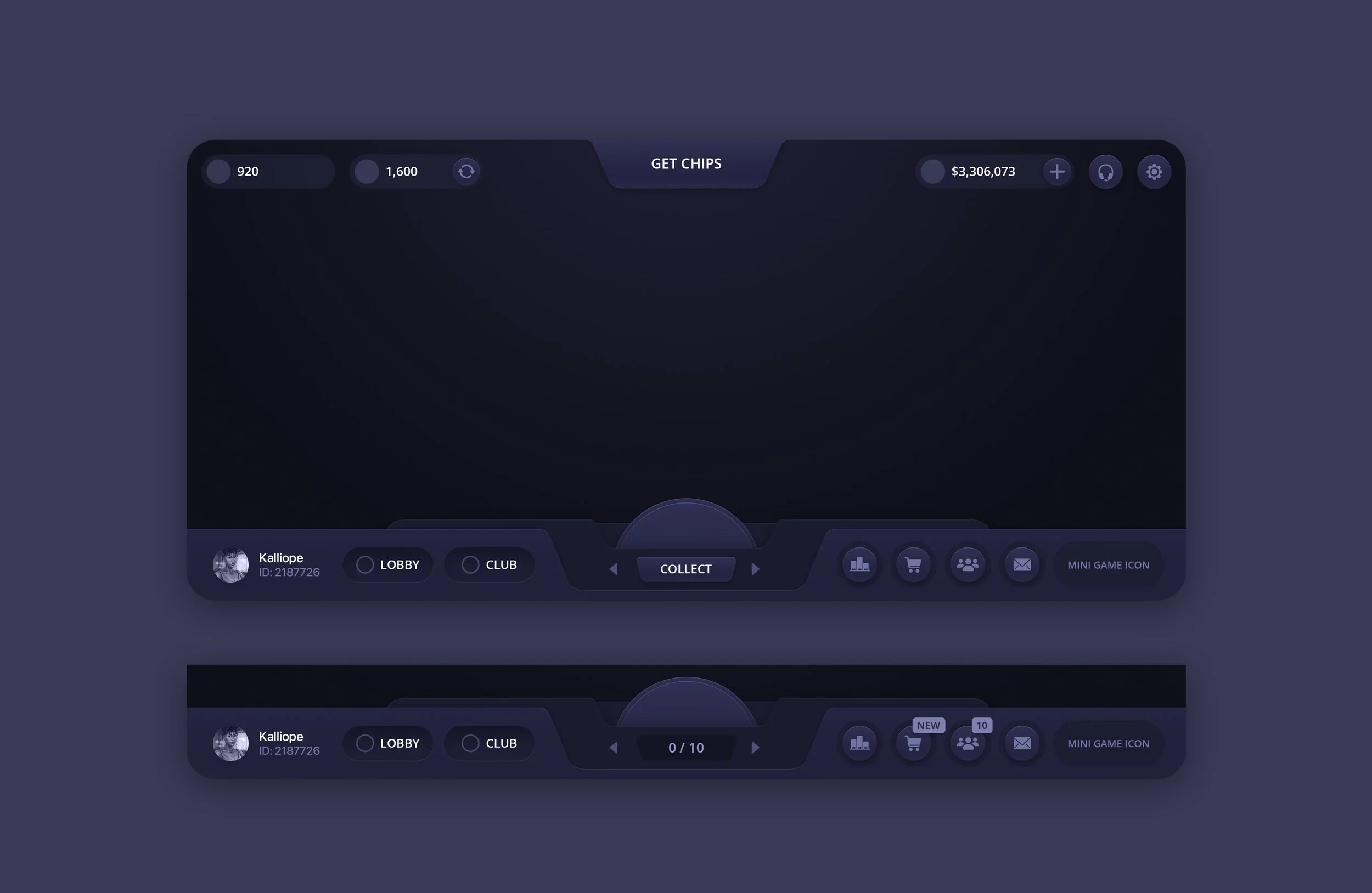
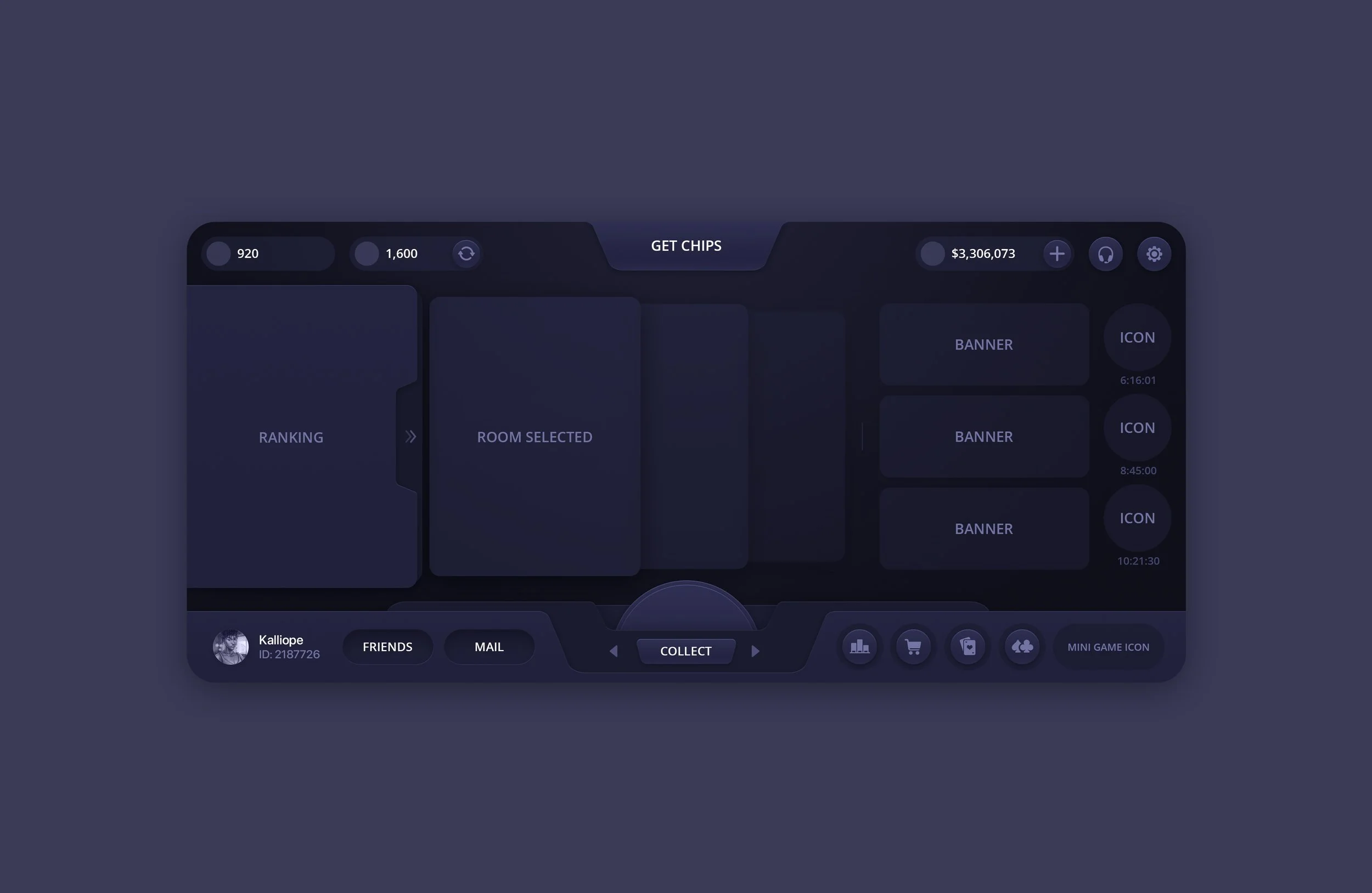
Imagine opening an app and instantly feeling at home, where every button is perfectly placed and every color speaks to you. That's the power of UI design!
It's the art of making digital interfaces not just functional, but beautiful and intuitive. UI design transforms mundane interactions into visually stunning experiences, making navigation feel like second nature. Whether it's the sleek dashboard of your favorite fitness app or the vibrant layout of an online store, great UI design captivates and engages. It's the silent hero that ensures you can effortlessly access what you need, turning every digital encounter into a pleasure. In a world where first impressions matter, no one brings the magic like The Skins Factory. See for yourself.
UI vs. UX at a Glance
How UI and UX Design Work Together
While UI and UX design are distinct disciplines, they are closely intertwined and often work hand-in-hand to create a cohesive digital experience. Here's how they complement each other:
UI design is responsible for the initial visual impact. A well-designed interface can attract users and encourage them to explore further. However, without good UX design, users might quickly become frustrated if they can't accomplish their goals easily.
UX design ensures that the product is functional and meets user needs, while UI design ensures that this functionality is presented in an attractive and accessible way.
Consistent UI elements contribute to a better UX by making the interface predictable and easier to navigate. Conversely, good UX design informs the UI designer about the best placement and style of elements to enhance usability.
Both UI and UX designers must collaborate closely, often iterating based on user feedback and testing results. This collaborative process helps in refining both the visual appeal and the usability of the product.
FortifyData: Cybersecurity Web App UI/UX Design
Consider FortifyData, a cybersecurity web application, as a good example of how UI design and layout refinement work together without requiring a full UX engagement.
FortifyData's core user flows were already solid. The application worked. What it needed was a visual design system that matched the seriousness of an enterprise security platform, along with some modern layout restructuring to better surface the data users needed most.
On the UI side, we developed a color system that communicated risk levels clearly, not just aesthetically. We built a typography hierarchy that made dense security data readable under pressure, and refined the iconography for clarity at the compact sizes the dashboard required. We also added neumorphic design elements that gave subtle depth to a 2D look & feel, which has become stale over the past decade.
The layout work ran alongside it. We reorganized how information was weighted and grouped on key screens so that critical data was front and center without requiring extra navigation. This kind of layout refinement is something we work into UI engagements naturally. When you're already deep inside a product's visual design, you see what's competing for attention unnecessarily, and addressing it is the right call.
The end result was an interface that looked and performed like the serious enterprise tool FortifyData actually is.
The UI designer would focus on creating a visually appealing dashboard with a color scheme that reflects the brand's identity, designing intuitive icons for different functions (like monitoring the Score Tolerance Matrix), and ensuring that the typography is readable and pleasant.
The UX designer would conduct research to understand what features users need most and map out the user journey to ensure critical tasks, like monitoring top risks, flow intuitively. From there, wireframes are created to test and refine the flow of actions before any visual design begins. Usability testing then identifies and resolves any friction points that would hinder user satisfaction.
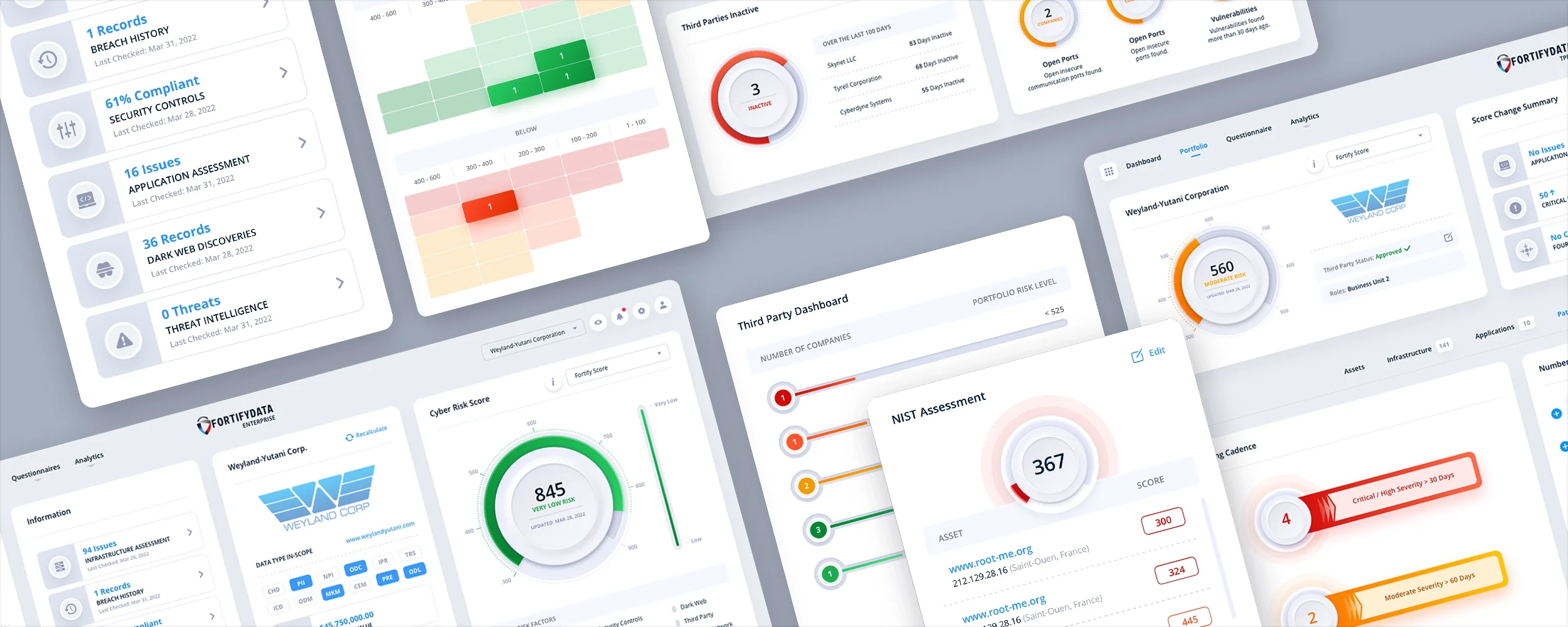
FortifyData, a Cybersecurity Web Application
Where UI and UX Converge: Design Systems
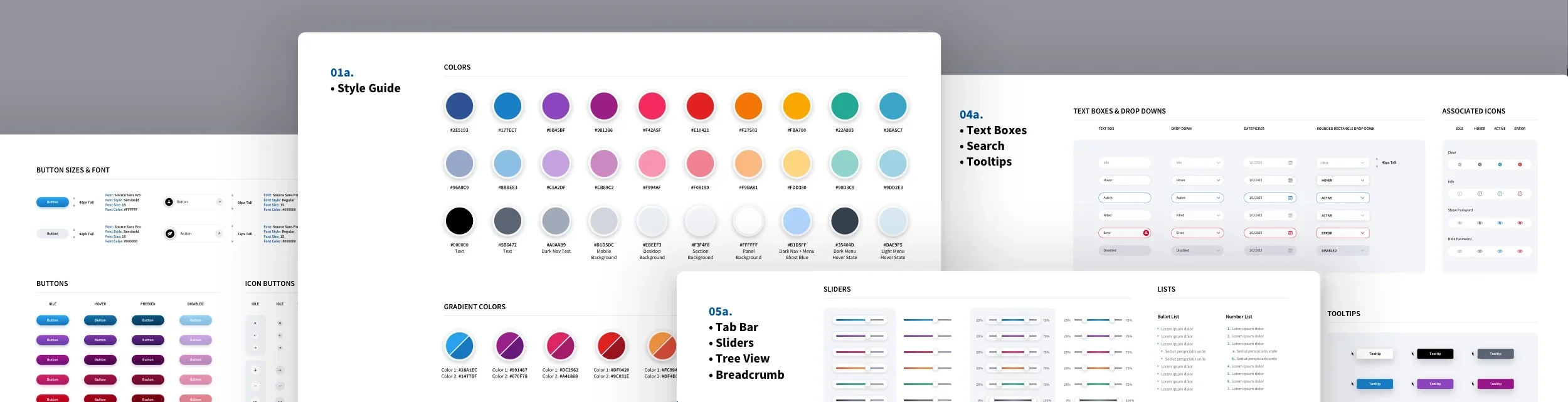
There's a third discipline that doesn't get enough attention in conversations like this one: Design Systems.These will become even more prevalent as companies weave AI UI into their interfaces. It just so happens The Skins Factory has been designing systems for more then 20 years. We just called them UI Kits & Style Guides back then.
A Design System is where UI and UX formally converge into a scalable, documented framework. It's the bridge between the behavioral logic of UX, how things work, and the visual language of UI, how things look. Both are codified into a reusable library of components, patterns, and guidelines that any design or development team can build from consistently. Since we design both the user interface and the underlying design system, your developers can build future pages with confidence, ensuring everything stays visually consistent, scalable, and aligned over time.
Design systems formalize UX logic and UI language into a single source of truth every team builds from.
Without one, UI decisions get made without UX context. New screens get built without reference to established patterns.
It's the difference between a product that holds together at launch and one that still holds together as it grows.
We build custom design systems as a dedicated service, because we've seen too many beautifully designed products fall apart at scale without one. Learn more about our Design System Creation services here.
Frequently Asked Questions
Which comes first, UI or UX?
UX always comes first. You need to establish the user journey, validate the information architecture, and confirm flows through prototyping and testing before any visual design begins. Building UI on top of unvalidated UX is one of the most expensive mistakes a product team can make. You end up polishing something that may need structural changes.
Is UX or UI more important?
Neither. They serve different purposes at different phases. Asking which is more important is like asking whether a building's structural engineering or its interior design matters more. The structure has to be right. The interior has to be right. One without the other produces something that either falls down or no one wants to be in.
Can one person do both UI and UX?
Yes, though it's worth knowing that the skillsets are genuinely different. UX favors systems thinking, research methodology, and behavioral psychology. UI favors visual design sensibility, typography, color theory, and motion design. Many designers are competent in both, but exceptional practitioners tend to skew toward one. For complex products, we often have both disciplines represented in a project engagement.
What's the difference between UX and product design?
Product design is increasingly used as an umbrella term that encompasses both UX and UI, along with business strategy considerations. Many tech companies use "product designer" to mean someone who owns the end-to-end design of a feature or product, including research, flows, and visual execution. The disciplines inside it are still UX and UI.
Do I need UX design if I'm just refreshing my app's visual design?
Not necessarily, and we'll tell you that honestly. If your app's flows are solid and users aren't confused about how to accomplish tasks, a UI refresh is often the right scope. That said, we always flag UX-level improvements we notice during UI work, because they're often inexpensive to address while we're already in the design.
How do I know if my app has a UX problem vs. a UI problem?
A UX problem typically surfaces as users who can't figure out how to complete a task, drop off at a specific point in a flow, or report that the product is confusing. A UI problem surfaces as users who understand how to use the product but find it visually dated, untrustworthy, or off-brand. Support ticket volume and usability test recordings are usually the fastest way to diagnose which you're dealing with.
Why Both Are Important
Both UI and UX design are critical to the success of a digital product. A beautiful interface (UI) without a thoughtful user experience (UX) can lead to frustration and dissatisfaction. Conversely, a well-planned user experience (UX) without a visually appealing interface (UI) may fail to engage users effectively. Combining great UI and UX design ensures that users not only find the product easy to use but also enjoyable and satisfying. Keep in mind that if you're simply refreshing the UI's visual design, comprehensive UX design is unnecessary. An experienced UI/UX design studio like The Skins Factory can weave in user experience design while we're doing the visual refresh. This presents itself in subtle ways to make the UI more intuitive with subtle changes to the visual design.
UI and UX design are two sides of the same coin. UI design is all about the visual and interactive aspects of a product, while UX design focuses on the overall user journey and experience. By understanding and integrating both disciplines, designers can create digital products that are not only functional but also delightful to use. Whether you're a designer or a product manager, appreciating the unique contributions of UI and UX design can lead to more successful and user-centered outcomes.
If you want to see a more in-depth view of the process, then click here for a look into the creation of a social media mobile app we designed for a client based on a single sentence: "I want to be able to put a name to a face." And if you're evaluating agencies for your next project, here's what to look for when hiring a UI/UX design agency.
Have a project in mind? Let's talk.
Thank you for reaching out.
We will be in touch within one business day.
About Jeff Schader
Jeff Schader is the founder and CEO of The Skins Factory, a UI/UX design studio he started in 2000, based in the Miami/Fort Lauderdale area. He has designed software for some of the biggest names in tech and entertainment, including Microsoft, Disney, the NFL, Bank of America, and Intel, along with SaaS, fintech, healthcare, cybersecurity, and enterprise platforms. Jeff runs The Skins Factory lean and stays hands-on across client work, strategy, and design. He writes about UI/UX, AI interfaces, and what actually makes software usable.
Have a project in mind? Schedule a 30-minute call with Jeff. Jeff also publishes The Product Design Insider on Substack.
