
HomeFirst by CareCentrix
Healthcare UI/UX Design iPad Application + Patient Discharge Templates
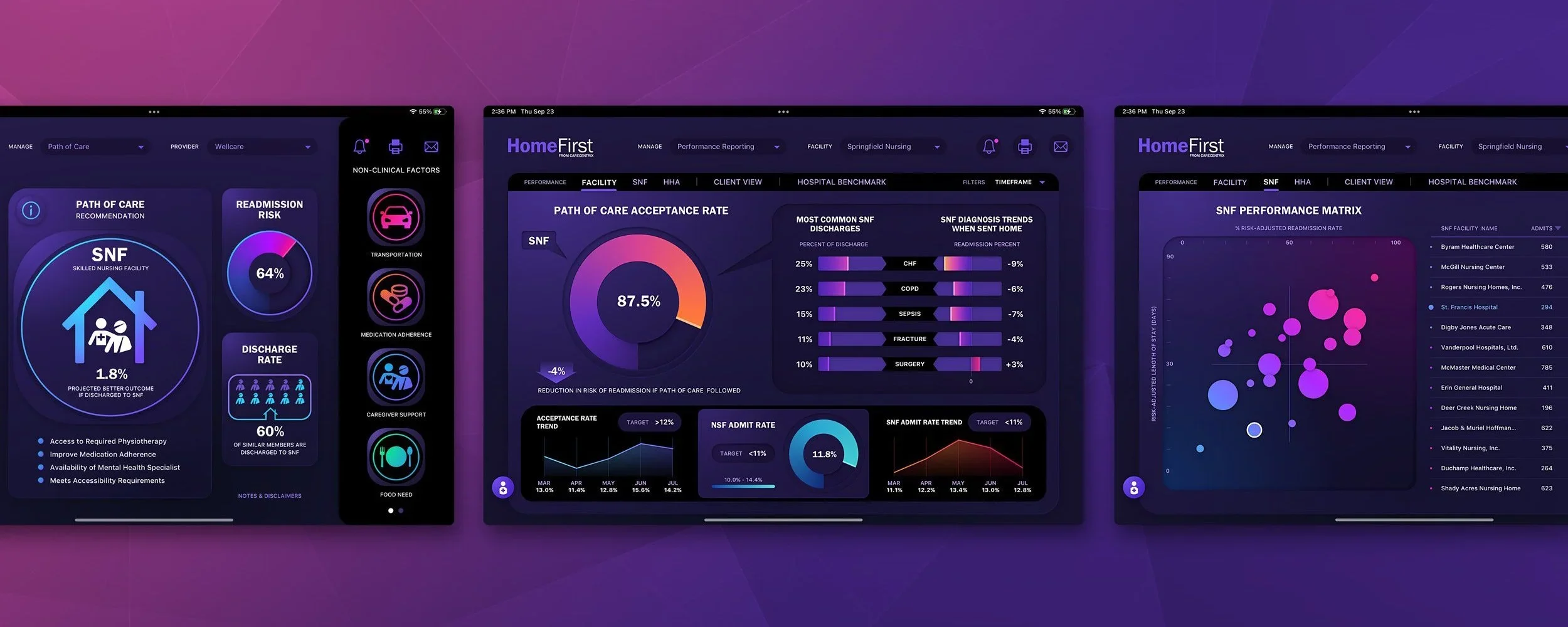
CareCentrix contracted The Skins Factory to design HomeFirst, an iPad application used by hospital nurses to review patient outcomes and determine the most appropriate path for discharge. Two years later, CareCentrix returned to us to extend the experience into printable color and black-and-white discharge documents and a companion tablet template. Across both engagements, the work was grounded in the realities of nurses operating under pressure in demanding hospital environments.
The Challenge
Designing for nurses working under constant pressure
Hospital nurses needed to verify that they were working with the correct patient, interpret outcome analytics, evaluate provider recommendations, compare facilities, adjust distance-based filters, and make discharge decisions without unnecessary delay. The application had to present substantial clinical and operational information clearly while being used under intense fluorescent lighting and during a period when hospital staff were already facing extraordinary levels of pressure.
Our Approach
Creating a calmer environment without sacrificing clarity
We used a deep-purple visual environment to create a greater sense of calm and focus, balanced by vibrant gradients, large typography, clear iconography, and tactile neumorphic details. Critical patient information remained in a high-contrast white sidebar for fast verification. Within provider recommendations, collapsible filters and results tables allowed nurses to expand the map without losing functionality, while colorful reporting visualizations made dense performance analytics easier to distinguish and review.
★★★★★
“The design they delivered was incredibly well done; it was visually awesome.”
Michael Ducharme, VP of Product & Analytics, CareCentrix
Dashboard: Path of care
It is vitally important for the Nurses to make sure they were working with the correct patient, so we designed the left sidebar of the Dashboard with a traditional white background / dark text. It’s a known fact that dark text on a white background is the easiest combination to read with , causing the least amount of eye strain. For the rest of the Dashboard (and subsequent screens) we used a deep purple background with neumorphic enhancements, vibrant color gradients and large text & iconography to enhance usability.


Performance Reporting
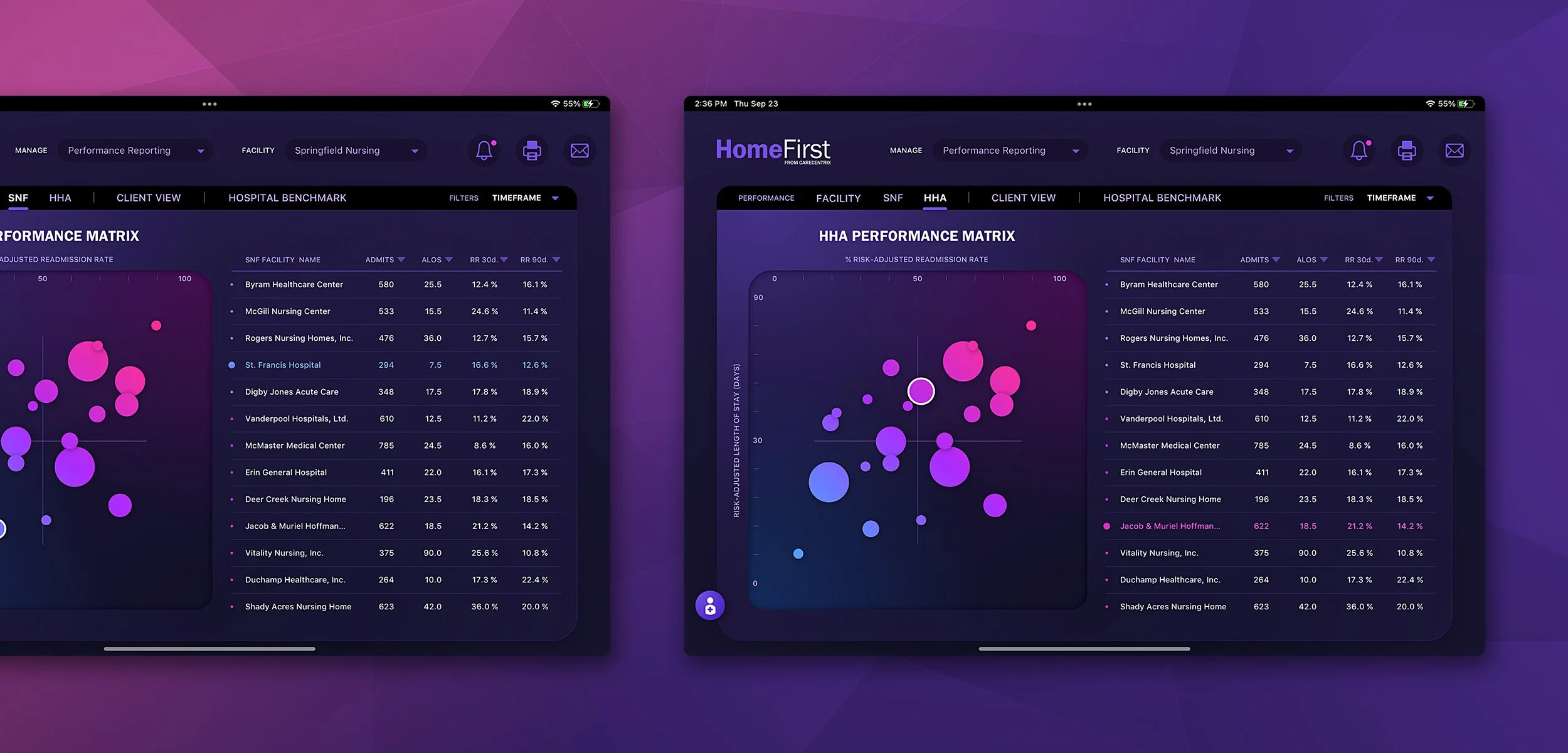
The Performance Reporting screens are heavy in analytics and were a joy to design. We wanted to really make the various graphs “pop” off the screen and add an element of fun to them. From Line & Radial Graphs to Scatterplot Graphs, information is delivered to the Nurses in a colorful, enjoyable way.

Dashboard: Provider Recommendations
One of the core features of the HomeFirst application is figuring out whether or not patients can be discharged and to where. We had a lot of internal discussions figuring out the best way to increase the size of the map area without sacrificing functionality.
Above: Default Layout
The left sidebar delivers the Medical Facility and Patient information. In the center, the map with touch points and the table delivering pertinent metadata about the Providers with the filtered distance. The far right sidebar is the the filtering system a Nurse can slide the scrubber to alter filtering results. You’ll notice the pink, double chevron arrow icons. Those are for collapsing the table and / or right sidebar.
Above: Right Sidebar Collapsed
As you can see, the right sidebar has been collapsed, but the functionality has stayed intact. We transitioned the circular scrubbers to vertical ones. The 3 icons at the top have been collapsed into a MORE icon with easy accessibility.
Above: Table Collapsed
The table has been collapsed down, freeing up more vertical room for the map. With the table collapsed, the user can touch map points and glean the same information shown in the now collapsed table.
Login
The Login Screen design was designed to be a 2D, digital diorama creating a sense of shallow depth.
CareCentrix Discharge Printable Template Design
Streamlining Discharge Processes: How CareCentrix and The Skins Factory Collaborated to Make Patient Discharges More Efficient
As the healthcare industry continues to evolve, there's a growing need for more efficient and streamlined processes, especially when it comes to patient care. Discharge processes, in particular, have historically been a pain point for both patients and healthcare providers. But now, thanks to the innovative collaboration between CareCentrix and The Skins Factory, the future of healthcare discharge processes is looking brighter than ever. By leveraging CareCentrix’s cutting-edge technology and a commitment to quality patient care, and The Skins Factory’s seasoned, user experience design studio, together we’ve worked hand-in-hand to revolutionize the way patients are discharged from hospitals and other medical facilities.
PROJECT OVERVIEW
Two years after designing HomeFirst for CareCentrix, The Skins Factory was again tasked by our client. This time it was to design a discharge template for HomeFirst in two formats. One to be printed in the A4 format to be delivered to patients and a version to be viewed on a iPad or tablet by the Nurses.
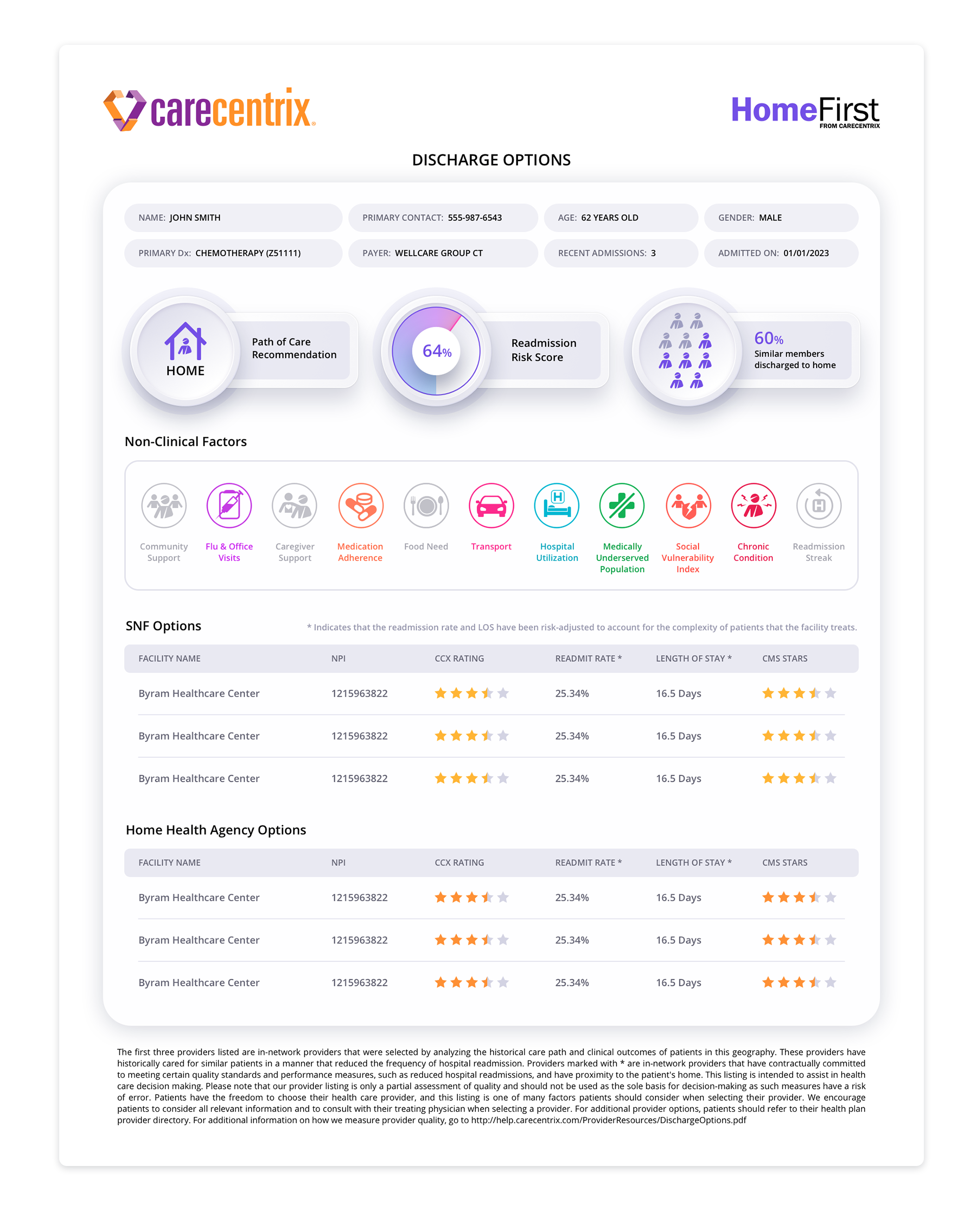
For the printable versions, our design team created them in two formats - Color and B&W. We understood that a color version couldn’t be a drain on the printer’s ink supply. One of the key elements of efficient design is the use of color. Color can help to organize information, highlight important details, and make printed materials more visually appealing. So we used it sparingly, but effectively.
We carried over some of the design language from the iPad user interface we designed, and made subtle changes for this new format. One of the embellishments we brought over were subtle neumorphic design touches that lifted pertinent information off of the background, creating a stylistic approach to an otherwise 2D, flat design.
The version you see below is the single page format in color. A two-page design was created that allowed for the Options Tables to contain more entries with each option table on their own page.
THE DELIVERABLES
Color Print Design Template
Non-Clinical Factors Iconography Design for Color Print
Considering that the original Home First iPad app icons resided on a dark background, our UX designers opted to use vibrant gradients for the new icons in order to make them visually stand out. The utilization of gradients added depth and dimension to the icons, capturing the attention of the users and creating a more engaging experience. By employing vibrant gradients, our designers were able to create a visual contrast that made the icons "pop" off the screen, ensuring that they could be easily noticed by the users.
Creating New Icons
Part of the new task at hand was to develop four new icons to be added to the existing icon set of the Home First iPad app. With this goal in mind, we set out to create icons that would be visually striking and easy to understand for the users while merging seamlessly with the icons we created for the app.
Enhancing Legibility with a Singular, Vibrant Color
During the process of adapting the icons for print purposes, our team faced the challenge of maintaining legibility and aesthetic appeal. We decided to convert all active icons to a singular, vibrant color that would not only improve legibility but also create a consistent visual language. This design choice, allowed for a harmonious integration of the new icons into the existing icon set, providing users with a seamless experience.
Distinguishing Inactive Icons through Graying Out
In the context of patient-centered design, it is crucial to provide clarity and avoid confusion. To achieve this, we took a thoughtful approach to icons that did not apply to the patient. These icons were visually differentiated by graying them out, clearly indicating their inactive nature. This design decision ensured that users could easily distinguish between the active icons and those that were not relevant to their clinical needs.

B&W Print Design Template
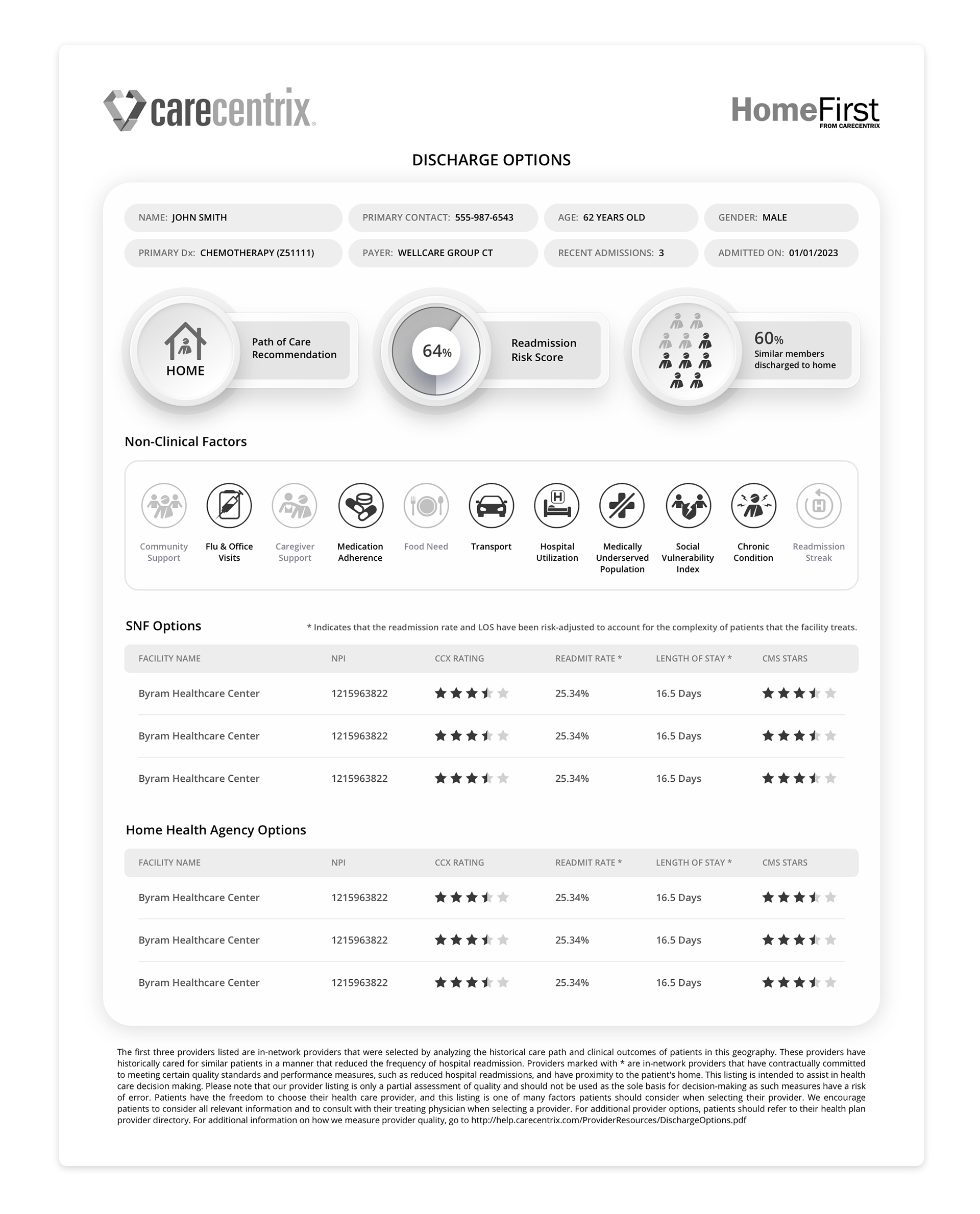
Black and white printing may not seem like a complicated task, but achieving the perfect balance between contrast and clarity can be an art form in itself. We ran multiple printing tests to fine-tune the contrast and legibility of the discharge document, while taking into account the amount of printer ink that would be used.
Non-Clinical Factors Iconography Design for B&W Print
With color, you can differentiate between active or inactive by using color and grayscale. With B&W we didn’t have that ability. So active icons became pure black and inactive icons stayed muted and grayscale.

Color Tablet Design Template
The final task was to create a tablet version of the print template. To achieve this, the design team took design cues from the original application design and updated them slightly to reflect current trends. As a result, the layout of the tablet version is crisp, sleek, and modern. One of the design elements that make the all versions stand out is the use of neumorphic embellishments. They help to lift the content off the screen, making it more engaging and visually appealing.
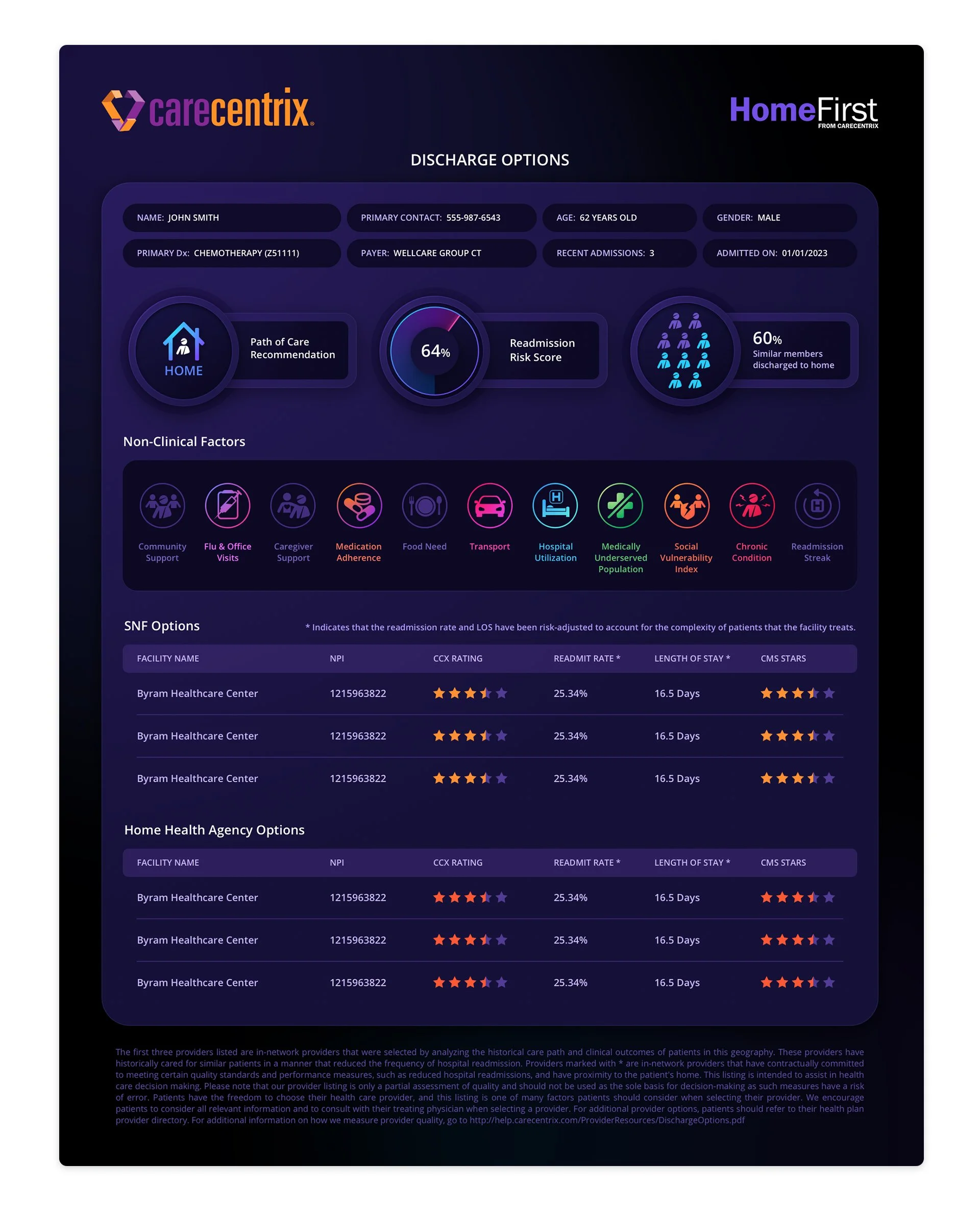
Non-Clinical Factors Iconography Design for Tablet
We stayed true to the original iPad icon design infusing them with rich gradients while creating new ones for the additional 4 icons. Inapplicable icons use the original muted, deep purple design language.

